Sun, 30 Apr 2017
What do you mean ExceptT doesn't Compose?
Disclaimer: I work at Ambiata (our Github presence) probably the biggest Haskell shop in the southern hemisphere. Although I mention some of Ambiata's coding practices, in this blog post I am speaking for myself and not for Ambiata. However, the way I'm using ExceptT and handling exceptions in this post is something I learned from my colleagues at Ambiata.
At work, I've been spending some time tracking down exceptions in some of our Haskell code that have been bubbling up to the top level an killing a complex multi-threaded program. On Friday I posted a somewhat flippant comment to Google Plus:
Using exceptions for control flow is the root of many evils in software.
Lennart Kolmodin who I remember from my very earliest days of using Haskell in 2008 and who I met for the first time at ICFP in Copenhagen in 2011 responded:
Yet what to do if you want composable code? Currently I have
type Rpc a = ExceptT RpcError IO a
which is terrible
But what do we mean by "composable"? I like the wikipedia definition:
Composability is a system design principle that deals with the inter-relationships of components. A highly composable system provides recombinant components that can be selected and assembled in various combinations to satisfy specific user requirements.
The ensuing discussion, which also included Sean Leather, suggested that these two experienced Haskellers were not aware that with the help of some combinator functions, ExceptT composes very nicely and results in more readable and more reliable code.
At Ambiata, our coding guidelines strongly discourage the use of partial functions. Since the type signature of a function doesn't include information about the exceptions it might throw, the use of exceptions is strongly discouraged. When using library functions that may throw exceptions, we try to catch those exceptions as close as possible to their source and turn them into errors that are explicit in the type signatures of the code we write. Finally, we avoid using String to hold errors. Instead we construct data types to carry error messages and render functions to convert them to Text.
In order to properly demonstrate the ideas, I've written some demo code and made it available in this GitHub repo. It compiles and even runs (providing you give it the required number of command line arguments) and hopefully does a good job demonstrating how the bits fit together.
So lets look at the naive version of a program that doesn't do any exception handling at all.
  import Data.ByteString.Char8 (readFile, writeFile)

  import Naive.Cat (Cat, parseCat)
  import Naive.Db (Result, processWithDb, renderResult, withDatabaseConnection)
  import Naive.Dog (Dog, parseDog)

  import Prelude hiding (readFile, writeFile)

  import System.Environment (getArgs)
  import System.Exit (exitFailure)

  main :: IO ()
  main = do
    args <- getArgs
    case args of
      [inFile1, infile2, outFile] -> processFiles inFile1 infile2 outFile
      _ -> putStrLn "Expected three file names." >> exitFailure

  readCatFile :: FilePath -> IO Cat
  readCatFile fpath = do
    putStrLn "Reading Cat file."
    parseCat <$> readFile fpath

  readDogFile :: FilePath -> IO Dog
  readDogFile fpath = do
    putStrLn "Reading Dog file."
    parseDog <$> readFile fpath

  writeResultFile :: FilePath -> Result -> IO ()
  writeResultFile fpath result = do
    putStrLn "Writing Result file."
    writeFile fpath $ renderResult result

  processFiles :: FilePath -> FilePath -> FilePath -> IO ()
  processFiles infile1 infile2 outfile = do
    cat <- readCatFile infile1
    dog <- readDogFile infile2
    result <- withDatabaseConnection $ \ db ->
                 processWithDb db cat dog
    writeResultFile outfile result
Once built as per the instructions in the repo, it can be run with:
  dist/build/improved/improved Naive/Cat.hs Naive/Dog.hs /dev/null
  Reading Cat file 'Naive/Cat.hs'
  Reading Dog file 'Naive/Dog.hs'.
  Writing Result file '/dev/null'.
The above code is pretty naive and there is zero indication of what can and cannot fail or how it can fail. Here's a list of some of the obvious failures that may result in an exception being thrown:
- Either of the two readFile calls.
- The writeFile call.
- The parsing functions parseCat and parseDog.
- Opening the database connection.
- The database connection could terminate during the processing stage.
So lets see how the use of the standard Either type, ExceptT from the transformers package and combinators from Gabriel Gonzales' errors package can improve things.
Firstly the types of parseCat and parseDog were ridiculous. Parsers can fail with parse errors, so these should both return an Either type. Just about everything else should be in the ExceptT e IO monad. Lets see what that looks like:
  {-# LANGUAGE OverloadedStrings #-}
  import           Control.Exception (SomeException)
  import           Control.Monad.IO.Class (liftIO)
  import           Control.Error (ExceptT, fmapL, fmapLT, handleExceptT
                                 , hoistEither, runExceptT)

  import           Data.ByteString.Char8 (readFile, writeFile)
  import           Data.Monoid ((<>))
  import           Data.Text (Text)
  import qualified Data.Text as T
  import qualified Data.Text.IO as T

  import           Improved.Cat (Cat, CatParseError, parseCat, renderCatParseError)
  import           Improved.Db (DbError, Result, processWithDb, renderDbError
                               , renderResult, withDatabaseConnection)
  import           Improved.Dog (Dog, DogParseError, parseDog, renderDogParseError)

  import           Prelude hiding (readFile, writeFile)

  import           System.Environment (getArgs)
  import           System.Exit (exitFailure)

  data ProcessError
    = ECat CatParseError
    | EDog DogParseError
    | EReadFile FilePath Text
    | EWriteFile FilePath Text
    | EDb DbError

  main :: IO ()
  main = do
    args <- getArgs
    case args of
      [inFile1, infile2, outFile] ->
              report =<< runExceptT (processFiles inFile1 infile2 outFile)
      _ -> do
          putStrLn "Expected three file names, the first two are input, the last output."
          exitFailure

  report :: Either ProcessError () -> IO ()
  report (Right _) = pure ()
  report (Left e) = T.putStrLn $ renderProcessError e


  renderProcessError :: ProcessError -> Text
  renderProcessError pe =
    case pe of
      ECat ec -> renderCatParseError ec
      EDog ed -> renderDogParseError ed
      EReadFile fpath msg -> "Error reading '" <> T.pack fpath <> "' : " <> msg
      EWriteFile fpath msg -> "Error writing '" <> T.pack fpath <> "' : " <> msg
      EDb dbe -> renderDbError dbe


  readCatFile :: FilePath -> ExceptT ProcessError IO Cat
  readCatFile fpath = do
    liftIO $ putStrLn "Reading Cat file."
    bs <- handleExceptT handler $ readFile fpath
    hoistEither . fmapL ECat $ parseCat bs
    where
      handler :: SomeException -> ProcessError
      handler e = EReadFile fpath (T.pack $ show e)

  readDogFile :: FilePath -> ExceptT ProcessError IO Dog
  readDogFile fpath = do
    liftIO $ putStrLn "Reading Dog file."
    bs <- handleExceptT handler $ readFile fpath
    hoistEither . fmapL EDog $ parseDog bs
    where
      handler :: SomeException -> ProcessError
      handler e = EReadFile fpath (T.pack $ show e)

  writeResultFile :: FilePath -> Result -> ExceptT ProcessError IO ()
  writeResultFile fpath result = do
    liftIO $ putStrLn "Writing Result file."
    handleExceptT handler . writeFile fpath $ renderResult result
    where
      handler :: SomeException -> ProcessError
      handler e = EWriteFile fpath (T.pack $ show e)

  processFiles :: FilePath -> FilePath -> FilePath -> ExceptT ProcessError IO ()
  processFiles infile1 infile2 outfile = do
    cat <- readCatFile infile1
    dog <- readDogFile infile2
    result <- fmapLT EDb . withDatabaseConnection $ \ db ->
                 processWithDb db cat dog
    writeResultFile outfile result
The first thing to notice is that changes to the structure of the main processing function processFiles are minor but all errors are now handled explicitly. In addition, all possible exceptions are caught as close as possible to the source and turned into errors that are explicit in the function return types. Sceptical? Try replacing one of the readFile calls with an error call or a throw and see it get caught and turned into an error as specified by the type of the function.
We also see that despite having many different error types (which happens when code is split up into many packages and modules), a constructor for an error type higher in the stack can encapsulate error types lower in the stack. For example, this value of type ProcessError:
EDb (DbError3 ResultError1)
contains a DbError which in turn contains a ResultError. Nesting error types like this aids composition, as does the separation of error rendering (turning an error data type into text to be printed) from printing.
We also see that with the use of combinators like fmapLT, and the nested error types of the previous paragraph, means that ExceptT monad transformers do compose.
Using ExceptT with the combinators from the errors package to catch exceptions as close as possible to their source and converting them to errors has numerous benefits including:
- Errors are explicit in the types of the functions, making the code easier to reason about.
- Its easier to provide better error messages and more context than what is normally provided by the Show instance of most exceptions.
- The programmer spends less time chasing the source of exceptions in large complex code bases.
- More robust code, because the programmer is forced to think about and write code to handle errors instead of error handling being and optional afterthought.
Want to discuss this? Try reddit.
Posted at: 12:22 | Category: CodeHacking/Haskell | Permalink
Mon, 16 Nov 2015
Forgive me Curry and Howard for I have Sinned.
Forgive me Curry and Howard for I have sinned.
For the last several weeks, I have been writing C++ code. I've been doing some experimentation in the area of real-time audio Digital Signal Processing experiments, C++ actually is better than Haskell.
Haskell is simply not a good fit here because I need:
- To be able to guarantee (by inspection) that there is zero memory allocation/de-allocation in the real-time inner processing loop.
- Things like IIR filters are inherently stateful, with their internal state being updated on every input sample.
There is however one good thing about coding C++; I am constantly reminded of all the sage advice about C++ I got from my friend Peter Miller who passed away a bit over a year ago.
Here is an example of the code I'm writing:
  class iir2_base
  {
      public :
          // An abstract base class for 2nd order IIR filters.
          iir2_base () ;

          // Virtual destructor does nothing.
          virtual ~iir2_base () { }

          inline double process (double in)
          {
              unsigned minus2 = (minus1 + 1) & 1 ;
              double out = b0 * in + b1 * x [minus1] + b2 * x [minus2]
                              - a1 * y [minus1] - a2 * y [minus2] ;
              minus1 = minus2 ;
              x [minus1] = in ;
              y [minus1] = out ;
              return out ;
          }

      protected :
          // iir2_base internal state (all statically allocated).
          double b0, b1, b2 ;
          double a1, a2 ;
          double x [2], y [2] ;
          unsigned minus1 ;

      private :
          // Disable copy constructor etc.
          iir2_base (const iir2_base &) ;
          iir2_base & operator = (const iir2_base &) ;
  } ;
Posted at: 22:22 | Category: CodeHacking | Permalink
Tue, 21 Jul 2015
Building the LLVM Fuzzer on Debian.
I've been using the awesome American Fuzzy Lop fuzzer since late last year but had also heard good things about the LLVM Fuzzer. Getting the code for the LLVM Fuzzer is trivial, but when I tried to use it, I ran into all sorts of road blocks.
Firstly, the LLVM Fuzzer needs to be compiled with and used with Clang (GNU GCC won't work) and it needs to be Clang >= 3.7. Now Debian does ship a clang-3.7 in the Testing and Unstable releases, but that package has a bug (#779785) which means the Debian package is missing the static libraries required by the Address Sanitizer options. Use of the Address Sanitizers (and other sanitizers) increases the effectiveness of fuzzing tremendously.
This bug meant I had to build Clang from source, which nnfortunately, is rather poorly documented (I intend to submit a patch to improve this) and I only managed it with help from the #llvm IRC channel.
Building Clang from the git mirror can be done as follows:
  mkdir LLVM
  cd LLVM/
  git clone http://llvm.org/git/llvm.git
  (cd llvm/tools/ && git clone http://llvm.org/git/clang.git)
  (cd llvm/projects/ && git clone http://llvm.org/git/compiler-rt.git)
  (cd llvm/projects/ && git clone http://llvm.org/git/libcxx.git)
  (cd llvm/projects/ && git clone http://llvm.org/git/libcxxabi)

  mkdir -p llvm-build
  (cd llvm-build/ && cmake -G "Unix Makefiles" -DCMAKE_INSTALL_PREFIX=$(HOME)/Clang/3.8 ../llvm)
  (cd llvm-build/ && make install)
If all the above works, you will now have working clang and clang++ compilers installed in $HOME/Clang/3.8/bin and you can then follow the examples in the LLVM Fuzzer documentation.
Posted at: 20:08 | Category: CodeHacking | Permalink
Sat, 18 Oct 2014
Haskell : A neat trick for GHCi
Just found a really nice little hack that makes working in the GHC interactive REPL a little easier and more convenient. First of all, I added the following line to my ~/.ghci file.
:set -DGHC_INTERACTIVE
All that line does is define a GHC_INTERACTIVE pre-processor symbol.
Then in a file that I want to load into the REPL, I need to add this to the top of the file:
{-# LANGUAGE CPP #-}
and then in the file I can do things like:
  #ifdef GHC_INTERACTIVE
  import Data.Aeson.Encode.Pretty

  prettyPrint :: Value -> IO ()
  prettyPrint = LBS.putStrLn . encodePretty
  #endif
In this particular case, I'm working with some relatively large chunks of JSON and its useful to be able to pretty print them when I'm the REPL, but I have no need for that function when I compile that module into my project.
Posted at: 09:16 | Category: CodeHacking/Haskell | Permalink
Wed, 11 Jun 2014
Moving from Wai 2.X to 3.0.
Michael Snoyman has just released version 3.0 of Wai, the Haskell Web Application Interface library which is used with the Yesod Web Framework and anything that uses the Warp web server. The important changes for Wai are listed this blog post. The tl;dr is that removing the Conduit library dependency makes the Wai interface more easily usable with one of the alternative Haskell streaming libraries, like Pipes, Stream-IO, Iterator etc.
As a result of the above changes, the type of a web application changes as follows:
  -- Wai > 2.0 && Wai < 3.0
  type Application = Request -> IO Response

  -- Wai == 3.0
  type Application = Request -> (Response -> IO ResponseReceived) -> IO ResponseReceived
Typically a function of type Application will be run by the Warp web server using one of Warp.run or associated functions which have type signatures of:
  run :: Port -> Application -> IO ()

  runSettings :: Settings -> Application -> IO ()

  runSettingsSocket :: Settings -> Socket -> Application -> IO ()Source

  runSettingsConnection :: Settings -> IO (Connection, SockAddr) -> Application -> IO ()
Its important to note that the only thing that has changed about these Warp functions is the Application type. That means that if we have a function oldWaiApplication that we want to interface to the new version of Wai, we can just wrap it with the following function:
  newWaiApplication :: Manager -> Request -> (Response -> IO ResponseReceived) -> IO ResponseReceived
  newWaiApplication mgr wreq receiver = oldWaiApplication mgr wreq >>= receiver
and use newWaiApplication in place of oldWaiApplication in the call to whichever of the Warp run functions you are using.
Posted at: 20:16 | Category: CodeHacking/Haskell | Permalink
Wed, 08 Jan 2014
When QuickCheck Fails Me
This is an old trick I picked up from a colleague over a decade ago and have re-invented or re-remembered a number of times since.
When implementing complicated performance critical algorithms and things don't work immediately, the best idea is to drop back to the old formula of:
- Make it compile.
- Make it correct.
- Make it fast.
Often than means implementing slow naive versions of parts of the algorithm first and then one-by-one replacing the slow versions with fast versions. For a given function of two inputs, this might give me two functions with the identical type signatures:
   functionSlow :: A -> B -> C
   functionFast :: A -> B -> C
that can be used interchangeably.
When it comes to implementing the fast versions, the slow versions can be used to check the correct-ness of the fast version using a simple QuickCheck property like:
\ a b -> functionFast a b == functionSlow a b
This property basically just asks QuickCheck to generate a, b pairs, pass these to both functions and compare their outputs.
With something like this, QuickCheck usually all finds the corner cases really quickly. Except for when it doesn't. QuickCheck uses a random number generator to generate inputs to the function under test. If for instance you have a function that takes a floating point number and only behaves incorrectly when that input is say exactly 10.3, the chances of QuickCheck generating exactly 10.3 and hitting the bug are very small.
For exactly this reason, using the technique above sometimes doesn't work. Sometimes the fast version has a bug that Quickcheck wasn't able to find.
When this happens the trick is to write a third function:
  functionChecked :: A -> B -> C
  functionChecked a b =
      let fast = functionFast a b
          slow = functionSlow a b
      in if fast == slow
           then fast
           else error $ "functionFast " ++ show a ++ " " ++ show b
                ++ "\nreturns    " ++ show fast
                ++ "\n should be " ++ show slow
which calculates the function output using both the slow and the fast versions, compares the outputs and fails with an error if the two function outputs are not identical.
Using this in my algorithm I can then collect failing test cases that QuickCheck couldn't find. With a failing test case, its usually pretty easy to fix the broken fast version of the function.
Posted at: 21:03 | Category: CodeHacking/Haskell | Permalink
Sun, 29 Dec 2013
Haskell : The Problem with Integer.
Haskellers may or not be aware that there are two libraries in the GHC sources for implementing the Integer data type.
The first, integer-gmp links to the GNU Multiple Precision Arithmetic Library which is licensed under the GNU LGPL. On most systems, libgmp is dynamically linked and all is fine. However, if you want to create statically linked binaries from Haskell source code you end up with your executable statically linking libgmp which means your binary needs to be under an LGPL compatible license if you want to release it. This is especially a problem on iOS which doesn't allow dynamic linking anyway.
The second Integer implementation is integer-simple which is implemented purely in Haskell (using a number of GHC extension) and is BSD licensed.
So why doesn't everyone just the the BSD licensed one? Well, integer-simple has a reputation for being slow. Even more intriguingly, I seem to remember Duncan Coutts telling me a couple of years ago that integer-simple was a little faster than integer-gmp when the Integer was small enough to fit in a single machine Word, but much slower when that was not the case. At the time I heard this, I decided to look into it at some time. That time has come.
A couple of weeks ago I put together some scripts and code to allow me to compile the two Integer implementations into a single program and benchmark them against each other. My initial results looked like this:
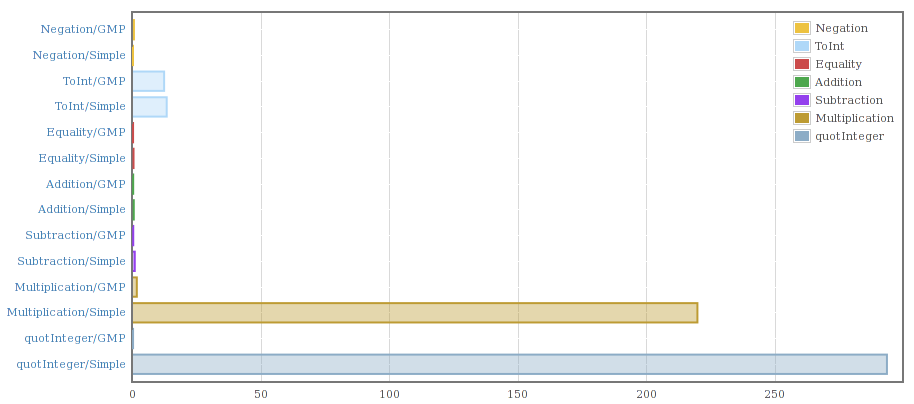
That confirmed the slowness for multiplication and division if nothing else.
Taking a look at the code to integer-simple I found that it was storing Word#s (unboxed machine sized words) in a Haskell list. As convenient as lists are they are not an optimal data structure for a something like the Integer library.
I have already started work on replacement for both versions of the current Integer library with the following properties:
- BSD licensed.
- Implemented in Haskell (with GHC extensions) so there are no issues with linking to external C libraries.
- Fast. I'm aiming to outperform both integer-simple and integer-gmp on as many benchmarks as possible.
- Few dependencies so it can easily replace the existing versions. Currently my code only depends on ghc-prim and primitive.
So far the results are looking encouraging. For Integer values smaller than a machine word, addition with my prototype code is faster than both existing libraries and for adding large integers its currently half the speed of integer-gmp, but I have an idea which will likely make the new library match the speed of integer-gmp.
Posted at: 10:08 | Category: CodeHacking/Haskell | Permalink
Tue, 22 Jan 2013
parMap to the Rescue.
I had a long running, CPU intensive Haskell program that I wanted to speed up. The program was basically a loop consisting of a a small sequential part followed by a map of a CPU intensive pure function over a list of 1500 elements.
Obviously I needed some sort of parallel map function and I had a faint recollection of a function called parMap. The wonderful Hoogle search engine pointed me to the parMap documentation.
Changing the existing sequential map operation into a parallel map required a 3 line change (one of them to import the required module). I then added "-threaded" to the compile command line to enable the threaded runtime system in the generated executable and "+RTS -N6" to the executable's command line. The resulting program went from using 100% of 1 CPU to using 560% of 1 CPU on an 8 CPU box. Win!
I wish all code was this easy to parallelize.
Posted at: 22:08 | Category: CodeHacking/Haskell | Permalink
Sat, 22 Dec 2012
My Space is Leaking.
Over the last couple of days I wrote a small Haskell program to read a large CSV file (75Meg, approx. 1000 columns and 50000 rows) and calculate some statistics. Since I would have to do this for much larger files as well, I decided to use the csv-conduit library to read the data and use a function passed to Data.Conduit's sinkState to calculate the statistics.
The code was pretty easy to put together, and only came to about 100 lines of code. Unfortunately, when I ran the program, it tried to consume all 8Gig of memory on my laptop and when I actually let it run to completion, it took over an hour to produce useful output.
A bit of quick profiling showed that the problem was with the state used to hold the statistics. The state itself wasn't huge, but Haskell's lazy evaluation meant there were a huge number of thunks (pending calculations) piling up.
Aside : Haskell does lazy (more correctly called non-strict) evaluation by default. This means that values are calculated when they are needed rather than when the program hits that point in the code. For instance if a value is generated by calling a pure function, the GHC runtime will forgo actually calling the function and replace the value with a thunk containing the function and it's input parameters. Later, when the value is actually needed, the runtime will call the function stored in the thunk.
My first attempt to fix this problem was to add some strictness annotations to my data types, but that didn't seem to help. I then looked at the deepseq package and tried adding the $!! operator in a few places. This resulted in a compile error complaining about my data structures not having an NFData instance. A bit of googling for "custom NFData instance" showed up the deepseq-th package which uses Template Haskell to generate NFData instances.
Aside : For a value to be an instance of the NFData typeclass means that it can be fully evaluated, ie a thunk to calculate a value of this type can be forced by deepseq to replace the thunk with the value.
About 10 minutes later I had my code working again, but now it processed the same file in a little over 2 minutes and used less than 0.1% of the 8Gig it was using previously.
I was happy with this. So happy that I decided to thank the author of deepseq-th, Herbert Valerio Riedel (hvr) on the #haskell IRC channel. Herbert was pleased to hear of my success, but suggested that instead of deepseq-th I try using deepseq-generics. Someone else on the channel suggested that this might be slower, but Herbert said that he had not found that to be the case. Switching from one to the other was trivially easy and pleasingly enough the generics version ran just as fast.
That's when José Pedro Magalhães (dreixel in #haskell) said that he had a draft paper "Optimisation of Generic Programs through Inlining" explaining how and why this generic implementation is just as fast as the Template Haskell version. Basically it boils down to the compiler having all the information it needs at compile time to inline and specialize the code to be just as fast as hand written code.
Reflections:
- Streaming I/O libraries like Data.Conduit (there's more than one) do give guarantees about space usage so that when you get a space leak the I/O is probably not the first place to look.
- For small programs its relatively easy to reason about where the space leak is happening.
- For a relatively experienced Haskeller, following the bread crumbs to a working solution is relatively easy.
- Code that uses a struct to accumulate state is a common contributor to space leaks.
- Interacting with the Haskell community can often get a better result than the first thing you find (eg deepseq-generics instead of deepseq-th).
- Generics can be just as fast as Template Haskell generated code.
Posted at: 16:42 | Category: CodeHacking/Haskell | Permalink
Tue, 24 Jan 2012
Benchmarking and QuickChecking readInt.
I'm currently working on converting my http-proxy library from using the Data.Enumerator package to Data.Conduit (explanation of why in my last blog post).
During this conversion, I have been studying the sources of the Warp web server because my http-proxy was originally derived from the Enumerator version of Warp. While digging through the Warp code I found the following code (and comment) which is used to parse the number provided in the Content-Length field of a HTTP header:
  -- Note: This function produces garbage on invalid input. But serving an
  -- invalid content-length is a bad idea, mkay?
  readInt :: S.ByteString -> Integer
  readInt = S.foldl' (\x w -> x * 10 + fromIntegral w - 48) 0
The comment clearly states that that this function can produce garbage, specifically if the string contains anything other than ASCII digits. The comment is also correct that an invalid Content-Length is a bad idea. However, on seeing the above code, and remembering something I had seen recently in the standard library, I naively sent the Yesod project a patch replacing the above code with a version that uses the readDec function from the Numeric module:
  import Data.ByteString (ByteString)
  import qualified Data.ByteString.Char8 as B
  import qualified Numeric as N

  readInt :: ByteString -> Integer
  readInt s =
      case N.readDec (B.unpack s) of
          [] -> 0
          (x, _):_ -> x
About 3-4 hours after I submitted the patch I got an email from Michael Snoyman saying that parsing the Content-Length field is a hot spot for the performance of Warp and that I should benchmark it against the code I'm replacing to make sure there is no unacceptable performance penalty.
That's when I decided it was time to check out Bryan O'Sullivan's Criterion bench-marking library. A quick read of the docs and bit of messing around and I was able to prove to myself that using readDec was indeed much slower than the code I wanted to replace.
The initial disappointment of finding that a more correct implementation was significantly slower than the less correct version quickly turned to joy as I experimented with a couple of other implementations and eventually settled on this:
  import Data.ByteString (ByteString)
  import qualified Data.ByteString.Char8 as B
  import qualified Data.Char as C

  readIntTC :: Integral a => ByteString -> a
  readIntTC bs = fromIntegral
          $ B.foldl' (\i c -> i * 10 + C.digitToInt c) 0
          $ B.takeWhile C.isDigit bs
By using the Integral type class, this function converts the given ByteString to any integer type (ie any type belonging to the Integral type class). When used, this function will be specialized by the Haskell compiler at the call site to to produce code to read string values into Ints, Int64s or anything else that is a member of the Integral type class.
For a final sanity check I decided to use QuickCheck to make sure that the various versions of the generic function were correct for values of the type they returned. To do that I wrote a very simple QuickCheck property as follows:
  prop_read_show_idempotent :: Integral a => (ByteString -> a) -> a -> Bool
  prop_read_show_idempotent freader x =
      let posx = abs x
      in posx == freader (B.pack $ show posx)
This QuickCheck property takes the function under test freader and QuickCheck will then provide it values of the correct type. Since the function under test is designed to read Content-Length values which are always positive, we only test using the absolute value of the value randomly generated by QuickCheck.
The complete test program can be found on Github in this Gist and can be compiled and run as:
ghc -Wall -O3 --make readInt.hs -o readInt && ./readInt
When run, the output of the program looks like this:
  Quickcheck tests.
  +++ OK, passed 100 tests.
  +++ OK, passed 100 tests.
  +++ OK, passed 100 tests.
  Criterion tests.
  warming up
  estimating clock resolution...
  mean is 3.109095 us (320001 iterations)
  found 27331 outliers among 319999 samples (8.5%)
    4477 (1.4%) low severe
    22854 (7.1%) high severe
  estimating cost of a clock call...
  mean is 719.4627 ns (22 iterations)

  benchmarking readIntOrig
  mean: 4.653041 us, lb 4.645949 us, ub 4.663823 us, ci 0.950
  std dev: 43.94805 ns, lb 31.52653 ns, ub 73.82125 ns, ci 0.950

  benchmarking readDec
  mean: 13.12692 us, lb 13.10881 us, ub 13.14411 us, ci 0.950
  std dev: 90.63362 ns, lb 77.52619 ns, ub 112.4304 ns, ci 0.950

  benchmarking readRaw
  mean: 591.8697 ns, lb 590.9466 ns, ub 594.1634 ns, ci 0.950
  std dev: 6.995869 ns, lb 3.557109 ns, ub 14.54708 ns, ci 0.950

  benchmarking readInt
  mean: 388.3835 ns, lb 387.9500 ns, ub 388.8342 ns, ci 0.950
  std dev: 2.261711 ns, lb 2.003214 ns, ub 2.585137 ns, ci 0.950

  benchmarking readInt64
  mean: 389.4380 ns, lb 388.9864 ns, ub 389.9312 ns, ci 0.950
  std dev: 2.399116 ns, lb 2.090363 ns, ub 2.865227 ns, ci 0.950

  benchmarking readInteger
  mean: 389.3450 ns, lb 388.8463 ns, ub 389.8626 ns, ci 0.950
  std dev: 2.599062 ns, lb 2.302428 ns, ub 2.963600 ns, ci 0.950
At the top of the output is proof that all three specializations of the generic function readIntTC satisfy the QuickCheck property. From the Criterion output its pretty obvious that the Numeric.readDec version is about 3 times slower that the original function. More importantly, all three version of this generic function are an order of magnitude faster than the original.
That's a win! I will be submitting my new function for inclusion in Warp.
Update : 14:13
At around the same time I submitted my latest version for readInt Vincent Hanquez posted a comment on the Github issue suggesting I look at the GHC MagicHash extension and pointed me to an example.
Sure enough, using the MagicHash technique resulted in something significantly faster again.
Update #2 : 2012-01-29 19:46
In version 0.3.0 and later of the bytestring-lexing package there is a function readDecimal that is even faster than the MagiHash version.
Posted at: 11:52 | Category: CodeHacking/Haskell | Permalink
Sat, 14 Jan 2012
A Simple Telnet Client Using Data.Conduit.
Below is a simple telnet client written using Haskell's new Conduit library. This library was written by Michael Snoyman the man behind the Yesod Web Framework for Haskell.
The Conduit library is a second generation approach to the problem of guaranteeing bounded memory usage in the presence of lazy evaluation. The first generation of these ideas were libraries like Iteratee, Enumerator, and IterIO. All of these first generation libraries use the the term enumerator for data producers and iteratee for data consumers. The new Conduit library calls data producers "sources" and data consumers "sinks" to make them a little more approachable.
The other big difference between Conduit and the early libraries in this space is to do with guaranteeing early clean up of potentially scarce resources like sockets. Although I have not looked in any detail at the IterIO library, both Iteratee and Enumerator simply rely on Haskell's garbage collector to clean up resources when they are no longer required. The Conduit library on the other hand uses Resource transformers to guarantee release of these resources as soon as possible.
The client looks like this (latest available here):
  import Control.Concurrent (forkIO, killThread)
  import Control.Monad.IO.Class (MonadIO, liftIO)
  import Control.Monad.Trans.Resource
  import Data.Conduit
  import Data.Conduit.Binary
  import Network (connectTo, PortID (..))
  import System.Environment (getArgs, getProgName)
  import System.IO


  main :: IO ()
  main = do
      args <- getArgs
      case args of
          [host, port] -> telnet host (read port :: Int)
          _ -> usageExit
    where
      usageExit = do
          name <- getProgName
          putStrLn $ "Usage : " ++ name ++ " host port"


  telnet :: String -> Int -> IO ()
  telnet host port = runResourceT $ do
      (releaseSock, hsock) <- with (connectTo host $ PortNumber $ fromIntegral port) hClose
      liftIO $ mapM_ (`hSetBuffering` LineBuffering) [ stdin, stdout, hsock ]
      (releaseThread, _) <- with (
                            forkIO $ runResourceT $ sourceHandle stdin $$ sinkHandle hsock
                            ) killThread
      sourceHandle hsock $$ sinkHandle stdout
      release releaseThread
      release releaseSock
There are basically three blocks, a bunch of imports at the top, the program's entry point main and the telnet function.
The telnet function is pretty simple. Most of the function runs inside a runResourceT resource transformer. The purpose of these resources transformers is to keep track of resources such as sockets, file handles, thread ids etc and make sure they get released in a timely manner. For example, in the telnet function, the connectTo function call opens a connection to the specified host and port number and returns a socket. By wrapping the connectTo in the call to with then the socket is registered with the resource transformer. The with function has the following prototype:
  with :: Resource m
       => Base m a             -- Base monad for the current monad stack
       -> (a -> Base m ())     -- Resource de-allocation function
       -> ResourceT m (ReleaseKey, a)
When the resource is registered, the user must also supply a function that will destroy and release the resource. The with function returns a ReleaseKey for the resource and the resource itself. Formulating the with function this way makes it hard to misuse.
The other thing of interest is that because a telnet client needs to send data in both directions, the server-to-client communication path and the client-to-server communication run in separate GHC runtime threads. The thread is spawned using forkIO and even though the thread identifier is thrown away, the resource transformer still records it and will later call killThread to clean up the thread.
The main core of the program are the two lines containing calls to sourceHandle and sinkHandle. The first of these lines pulls data from stdin and pushes it to the socket hsock while the second pulls from the socket and pushes it to stdout.
It should be noted that the final two calls to release are not strictly necessary since the resource transformer will clean up these resources automatically.
The experience of writing this telnet client suggests that the Conduit library is certainly easier to use than the Enumerator or Iteratee libraries.
Posted at: 13:22 | Category: CodeHacking/Haskell | Permalink
Sat, 01 Jan 2011
LLVM Backend for DDC : Very Nearly Done.
The LLVM backend for DDC that I've been working on sporadically since June is basically done. When compiling via the LLVM backend, all but three of 100+ tests in the DDC test suite pass. The tests that pass when going via the C backend but fail via the LLVM backend are of two kinds:
- Use DDC's foreign import construct to name a C macro to perform a type cast where the macro is defined in one of C header files.
- Use static inline functions in the C backend to do peek and poke operations on arrays of unboxed values.
In both of these cases, DDC is using features of the C language to make code generation easier. Obviously, the LLVM backend needs to do something else to get the same effect.
Fixing the type casting problem should be relatively simple. Ben is currently working on making type casts a primitive of the Core language so that both the C and LLVM backends can easily generate code for them.
The array peek and poke problem is little more complex. I suspect that it too will require the addition of new Core language primitive operations. This is a much more complex problem than the type casting one and I've only just begun to start thinking about it.
Now that the backend is nearly done, its not unreasonable to look at its performance. The following table shows the compile and run times of a couple of tests in the DDC test suite compiling via the C and the LLVM backend.
| Test name | C Build Time | LLVM Build Time | C Run Time | LLVM Run Time |
|---|---|---|---|---|
| 93-Graphics/Circle | 3.124s | 3.260s | 1.701s | 1.536s |
| 93-Graphics/N-Body/Boxed | 6.126s | 6.526s | 7.649s | 4.899s |
| 93-Graphics/N-Body/UnBoxed | 3.559s | 4.017s | 9.843s | 6.162s |
| 93-Graphics/RayTracer | 12.890s | 13.102s | 13.465s | 8.973s |
| 93-Graphics/SquareSpin | 2.699s | 2.889s | 1.609s | 1.604s |
| 93-Graphics/Styrene | 13.685s | 14.349s | 11.312s | 8.527s |
Although there is a small increase in compile times when compiling via LLVM, the LLVM run times are significantly reduced. The conceptual complexity of the LLVM backend is also low (the line count is about 4500 lines, which will probably fall with re-factoring) and thanks to LLVM's type checking being significantly better than C's, I think its reasonable to be more confident in the quality of the LLVM backend than the existing C backend. Finally, implementing things like proper tail call optimisation will be far easier in LLVM backend than in C.
All in all, I think doing this LLVM backend has been an interesting challenge and will definitely pay off in the long run.
Posted at: 13:54 | Category: CodeHacking/DDC | Permalink
Wed, 01 Dec 2010
LLVM Backend for DDC : Milestone #3.
After my last post on this topic, I ran into some problems with the AST (abstract syntax tree) that was being passed to my code for LLVM code generation. After discussing the problem with Ben, he spent some time cleaning up the AST definition, the result of which was that nearly all the stuff I already had, stopped working. This was a little disheartening. That and the fact that I was really busy, meant that I didn't touch the LLVM backend for a number of weeks.
When I finally did get back to it, I found that it wasn't as broken as I had initially thought. Although the immediate interface between Ben's code and mine had changed significantly, all the helper functions I had written were still usable. Over a week and a bit, I managed to patch everything up again and get back to where I was. I also did a lot of cleaning up and came up with a neat solution to a problem which was bugging me during my previous efforts.
The problem was that structs defined via the LLVM backend needed to have exactly the same memory layout as the structs defined via the C backend. This is a strict requirement for proper interaction between code generated via C and LLVM. This was made a little difficult by David Terei's haskell LLVM wrapper code (see previous post) which makes all structs packed by default, while structs on the C side were not packed. Another dimension of this problem was finding an easy way to generate LLVM code to access structs in a way that was easy to read and debug in the code generator and also not require different code paths for generating 32 and 64 bit code.
Struct layout is tricky. Consider a really simple struct like this:
  struct whatever
  {   int32_t tag ;
      char * pointer ;
  } ;
On a 32 bit system, that struct will take up 8 bytes; 4 bytes for the int32_t and 4 for the pointer. However, on a 64 bit system, where pointers are 8 bytes in size, the struct will take up 16 bytes. Why not 12 bytes? Well, some 64 bit CPUs (Alpha and Sparc64 are two I can think of) are not capable of unaligned memory accesses; a read from memory into a CPU register where the memory address (in bytes) is not an integer multiple of the size of the register. Other CPUs like x86_64 can read unaligned data, but reading unaligned data is usually slower than reading correctly aligned data.
In order to avoid unaligned, the compiler assumes that the start address of the struct will be aligned to the correct alignment for the biggest CPU register element in the struct, in this case the pointer. It then adds 4 bytes of padding between the int32_t and the pointer to ensure that if the struct is correctly aligned then the pointer will also be correctly aligned.
Because structs are packed in the David Terei's code, the above struct would require a different definition on 32 and 64 bit systems, ie
  ; 32 bit version of the struct
  %struct.whatever.32 = type <{ i32, i8 * }>

  ; 64 bit version of the struct
  %struct.whatever.64 = type <{ i32, [4 * i8], i8 * }>
where the 64 bit version contains 4 padding bytes. However, the difference between these two definitions causes another problem. To access fields within a struct, LLVM code uses the getelementptr operator which addresses fields by index. Unfortunately, the index (zero based) of the pointer is 1 for the 32 bit version and 2 for the 64 bit version. That would make code generation a bit of a pain in the neck.
The solution is allow the specification of LLVM structs in Haskell as a list of LlvmStructField elements, using
  data LlvmStructField
        = AField String LlvmType    -- Field name and type.
        | APadTo2                   -- Pad next field to a 2 byte offset.
        | APadTo4                   -- Pad next field to a 4 byte offset.
        | APadTo8                   -- Pad next field to a 8 byte offset.

        | APadTo8If64               -- Pad next field to a 8 byte offset only
                                    -- for 64 bit.
Note that the AField constructor requires both a name and the LlvmType. I then provide functions to convert the LlvmStructField list into an opaque LlvmStructDesc type and provide the following functions:
  -- | Turn an struct specified as an LlvmStructField list into an
  -- LlvmStructDesc and give it a name. The LlvmStructDesc may
  -- contain padding to make it conform to the definition.
  mkLlvmStructDesc :: String -> [LlvmStructField] -> LlvmStructDesc

  -- | Retrieve the struct's LlvmType from the LlvmStructDesc.
  llvmTypeOfStruct :: LlvmStructDesc -> LlvmType

  -- | Given and LlvmStructDesc and the name of a field within the
  -- LlvmStructDesc, retrieve a field's index with the struct and its
  -- LlvmType.
  structFieldLookup :: LlvmStructDesc -> String -> (Int, LlvmType)
Once the LlvmStructDesc is built for a given struct, fields within the struct can be addressed in the LLVM code generator by name, making the Haskell code generator code far easier to read.
Pretty soon after I got the above working I also managed to get enough LLVM code generation working to compile a complete small program which then runs correctly. I consider that to be milestone 3.
Posted at: 20:41 | Category: CodeHacking/DDC | Permalink
Tue, 30 Nov 2010
Functional Programing, Tail Call Recursion and Javascript.
About 6 weeks ago, I got an email from Craig Sharkie, who runs the Sydney Javascript group, SydJS. He was contacting me because I run the Sydney functional programing group and he was asking if I knew anyone who might be able to give a presentation about tail call recursion at SydJS. In the spirit of FP-Syd outreach I volunteered to do it, even though I haven't really done all that much Javascript.
On the night, I showed up, had a beer and then presented my slides. I started off explaining what functional programming is and why its is interesting (hint; common language features like garbage collection, dynamic typing, lambda expression and type inference all started in functional languages).
I used the factorial function as an example of function that can be implemented recursively and I demoed the Javascript versions in a web browser. I gave the standard recursive form whose stack usage grows linearly with n:
  function factorial (n)
  {
      /* Termination condition. */
      if (n <= 1)
          return 1 ;

    /* Recursion. */
      return n * factorial (n - 1) ;
  }
followed by the tail recursive form:
  function factorial (n)
  {
      function fac_helper (n, fac)
      {
          if (n <= 1)
              return fac ;
          return fac_helper (n - 1, n * fac) ;
      }

      return fac_helper (n, 1) ;
  }
Unfortunately even though this is written in tail recursive form, it still doesn't run in constant stack space. That's because neither the ECMAScript 3 and 5 standards mandate tail call optimisation and few of the Javascript engines implement it.
For languages whose compilers do implement the TCO, the above function will run in constant stack space and I demonstrated this using the same function written in Ocaml:
  (* Compile using: ocamlopt nums.cmxa mlfactorial.ml -o mlfactorial *)

  open Big_int

  (*
      val mult_int_big_int : int -> big_int -> big_int
          Multiplication of a big integer by a small integer
  *)
  let ($*) = mult_int_big_int

  let factorial n =
      let rec fac_helper x fac =
          if x <= 1 then
              fac
          else
              fac_helper (x - 1) (x $* fac)
      in
      fac_helper n unit_big_int

  let () =
      let n = int_of_string Sys.argv.(1) in
      let facn = factorial n in
      Printf.printf "factorial %d = %s\n" n (string_of_big_int facn)
When this program is run through the Ocaml compiler, the compiler detects that the factorial function is written in tail recursive form and that it can therefore use the Tail Call Optimisation and create a executable that runs in constant stack space. I demostrated the constant stack space usage by running it under valgrind using valgrind's DRD tool:
  > valgrind --quiet --tool=drd --show-stack-usage=yes ./factorial 5
  factorial 5 = 120
  ==3320== thread 1 finished and used 11728 bytes out of 8388608 on its stack. Margin: 8376880 bytes.
  > valgrind --quiet --tool=drd --show-stack-usage=yes ./factorial 10
  factorial 10 = 3628800
  ==3323== thread 1 finished and used 11728 bytes out of 8388608 on its stack. Margin: 8376880 bytes.
  > valgrind --quiet --tool=drd --show-stack-usage=yes ./factorial 20
  factorial 20 = 2432902008176640000
  ==3326== thread 1 finished and used 11728 bytes out of 8388608 on its stack. Margin: 8376880 bytes.
Regardless of the value of n the stack space used is constant (although, for much larger values of n, the Big_int calculations start easting a little more stack, but thats much less of a problem).
Finally, I showed a way of doing TCO by hand using a technique I found in Spencer Tipping's "Javascipt in Ten Minutes". The solution adds a couple of new properties to the prototype of the Function object to provide delimited continuations (another idea from functional programming). See the the code for the details. Suffice to say that this solution is really elegant and should be safe to run in just about any browser whose Javascript implementation is not completely broken.
As far as I am concerned, my presentation was received very well and the Twitter responses (all two of them) ranged from "brain melting" to "awesome".
I then hung around for the rest of the meeting, had another beer and chatted to people. One interesting part of the meeting was called "Di-script-ions", where a member of the audience would put up small 4-10 line snippets of Javascript code and asked the audience what they did and why. What was surprising to me that for some cases the semantics of a small piece of Javascript code is completely non-obvious. Javascript seems to have some very weird interactions between scoping rules, whether functions are defined directly or as a variable and the sequence of initialisation. Strange indeed.
Anyway, thanks to Craig Sharkie for inviting me. I had a great time.
Posted at: 21:47 | Category: CodeHacking | Permalink
Sat, 16 Oct 2010
libsndfile Malware on Windows.
I just found a very suspicious bit torrent download available here:
http://www.torrentzap.com/torrent/1581031/Libsndfile+%2864-Bit%29+1.0.23
The file being shared is intended to look like the Windows 64 bit installer for libsndfile-1.0.23 and seems to be widely available on this and a number of other torrent sites.
However, the file on the torrent sites is called libsndfile-64-bit-1.0.23.exe while the one I distribute is called libsndfile-1.0.23-w64-setup.exe.
I haven't analyzed the torrent version of the file; I simply don't have the tools or the knowledge to investigate it. I don't even have access to a machine that runs 64 bit Windows. The setup file on my website was cross compiled from Linux to 64 bit Windows using the very wonderful MinGW w64 tools and the setup installer created using INNO Setup running under Wine. However, the file is named differently and has a different md5sum. That in itself is more than enough reason to be suspicious.
The valid file that I distribute has the following md5 and sha256 sums:
    md5sum    : efe73b7cb52724e7db7bb7d6ce145929
    sha256sum : 30896dac1002a7b509b6f4620317dad730d8ad761e4ff0402db5a94b0d4c09a2
I'm not really aware of how problems like this are addressed on Windows. Is there a safe, secure, verifiable way of distributing Windows software packages? If so, I'd appreciate it if someone could let me know how its done.
For Linux this is much easier. Firstly, the vast majority of people on Linux install libsndfile via their Linux distribution. The person who packages libsndfile for any given distribution grabs the source code tarball from my web site. At the same time they should also grab the GPG signature file and verify that the source code tarball is correct and valid.
I don't know what happens in all distributions, but in Debian, the person doing the packaging GPG signs the package before uploading to the Debian servers. Once the GPG signed package is uploaded, the packager's GPG signature is checked before it goes into the unstable distribution. From there the validity of the package is tracked all the way to where an end user installs it on a machine via the process documented here. This process means that its very difficult to get malware onto a Linux machine via the distribution's package manager.
I suppose this in one more reason why people should be running Linux rather than Windows.
Posted at: 12:11 | Category: CodeHacking/libsndfile | Permalink
Thu, 07 Oct 2010
The (Problems with the) RF64 File Specification.
One of the very common sound file formats that libsndfile reads and writes is the WAV format. This format uses unsigned 32 bit integers internally to specify chunk lengths which limits the total size of well formed file to be about 4 gigabytes in size. On modern systems with high bit widths, multiple channels and high sample rates, this 4Gig limit can be run into very easily. For instance at a sample rate of 96kHz, with 24 bit samples, a 5.1 surround sound recording will run into the 4Gig limit after about 41 minutes.
In order to overcome the limitations of WAV, the European Broadcasting Union decided in 2006 to start the specification of an extended WAV file format capable of handling 64 bit file offsets. The document that resulted from this specification process was first released in 2006 and the latest update was made in 2009 and is available here. I have a number of problems with this specification document.
First and foremost, in section 3.5, the document states:
In spite of higher sampling frequencies and multi-channel audio, some production audio files will inevitably be smaller than 4 Gbyte and they should therefore stay in Broadcast Wave Format.
The problem arises that a recording application cannot know in advance whether the recorded audio it is compiling will exceed 4 Gbyte or not at end of recording (i.e. whether it needs to use RF64 or not).
The solution is to enable the recording application to switch from BWF to RF64 on the fly at the 4 Gbyte size-limit, while the recording is still going on.
This is achieved by reserving additional space in the BWF by inserting a 'JUNK' chunk 3 that is of the same size as a 'ds64' chunk. This reserved space has no meaning for Broadcast Wave, but will become the 'ds64' chunk, if a transition to RF64 is necessary.
In short, the suggestion above for writing a file boils down to:
- Open the file and write a RIFF/WAV file header with a JUNK section big enough to allow the header to be replaced with an RF64 header if needed.
- If the file ends up bigger than 4 gigabytes, go back and replace the existing header with an RF64 header.
There are two problems with this suggestion; it makes testing difficult and it makes the software more complex which means its more likely to contain bugs. The testing problem arises because testing that the RF64 header is written correctly can only be done by writing a 4 gigabyte file. Programmers can then either choose not to test this (which means the software is is highly unlikely to work as specified) or test write a full 4 Gig file. However, programmers also want their tests to run quickly (so that they can be run often) and writing 4 gigabytes of data to disk is definitely not going to be quick. Of course, a smaller unit test might be able to bypass the requirement of writing 4 gigabytes, but it would still be prudent to do a real test at the WAV to RF64 switch over point. The complexity problem is simply that writing a WAV file header first and then overwriting it with an RF64 header later is far more complicated than just writing an RF64 header to begin with. Complexity breeds bugs.
The libsndfile project has had, from the very beginning, a pretty comprehensive test suite and the running of that test suite takes about 30 seconds on current hardware. In order to comprehensively test the reading and writing of RF64 files, libsndfile disregards the rather silly suggestion of the EBU to convert on the fly between WAV and RF64 files. If the software calling libsndfile specifies that an RF64 file be generated, libsndfile will write an RF64 file, even if that file only contains 100 bytes.
A second problem with the RF64 specification is that the specification is ambiguous in a very subtle way. The problem is with how the binary chunks within the file are specified. For WAV files, chunks are specified in this document as:
  typedef unsigned long DWORD ;
  typedef unsigned char BYTE ;

  typedef DWORD FOURCC ;            // Four-character code
  typedef FOURCC CKID ;             // Four-character-code chunk identifier
  typedef DWORD CKSIZE ;            // 32-bit unsigned size value

  typedef struct {                  // Chunk structure
      CKID        ckID ;                   // Chunk type identifier
      CKSIZE      ckSize ;                 // Chunk size field (size of ckData)
      BYTE        ckData [ckSize] ;        // Chunk data
  } CK;
This specifies that a chunk has a 4 byte identifier, followed by a 4 byte chunk size, followed by the chunk data. The important thing to note here is that the chunk size does not include the 4 byte chunk identifier and the 4 byte chunk size field. Inspecting real WAV files found in the wild will confirm that this is the case for all common chunks found in WAV files.
Now contrast the above with how the chunks are specified in the EBU document. Ror instance the 'fmt ' chunk (which is common to both WAV and RF64) is specified as:
  struct FormatChunk5                // declare FormatChunk structure
  {
      char           chunkId[4];     // 'fmt '
      unsigned int32 chunkSize;      // 4 byte size of the 'fmt ' chunk
      unsigned int16 formatType;     // WAVE_FORMAT_PCM = 0x0001, etc.
      unsigned int16 channelCount;   // 1 = mono, 2 = stereo, etc.
      unsigned int32 sampleRate;     // 32000, 44100, 48000, etc.
      unsigned int32 bytesPerSecond; // only important for compressed formats
      unsigned int16 blockAlignment; // container size (in bytes) of one set of samples
      unsigned int16 bitsPerSample;  // valid bits per sample 16, 20 or 24
      unsigned int16 cbSize;         // extra information (after cbSize) to store
      char           extraData[22];  // extra data of WAVE_FORMAT_EXTENSIBLE when necessary
  };
Here, the chunkSize field is simply the "size of the 'fmt ' chunk" and nowhere in the EBU document is it specified exactly how that chunkSize field should be calculated. However, if you give the EBU documentation to any experienced software engineer with no previous knowledge of RIFF/WAV files, they would almost certainly assume that the chunkSize field should be the size of the whole chunk, including the chunkID and chunkSize fields. However, someone who knows about RIFF/WAV files will be less likely to follow that path.
This leaves the programmer implementing code to read and write this format with a couple of possibilities:
- Assume that the document is right and should be followed to the letter.
- Assume the document is wrong and that the 'fmt ' chunk of an RF64 file should be identical to that of a WAV file.
Give up and go home.
However, the last part of section 3.5 of the EBU/RF64 document describes how a WAV file is to be upgraded to an RF64 file, and that description makes no mention of the 'fmt ' chunk being modified during that upgrade. One can only assume from this, that the 'fmt ' chunk in an RF64 file should be identical to that of a WAV file and that the EBU/RF64 specification is misleading.
For libsndfile, I have decided to assume that the specification is indeed misleading. Unfortunately, I'm pretty sure that at some point I will be asked to at least read files which strictly adhere to the literal interpretation of the document. I'm also pretty sure that implementing code to read files written to conform to both interpretations of the spec will be a very painful exercise.
Posted at: 21:36 | Category: CodeHacking/libsndfile | Permalink
Sun, 03 Oct 2010
Distros and Test Suites.
libsndfile is cross platform and is expected to run on 32 and 64 bit CPUs on any system that is reasonably POSIX compliant (ie even Windows). It also has a lot of low level code that does things like endian swapping and bit shifting etc. Although I compile and test the code on all the systems I have access to, I don't have access to everything. That's why libsndfile has a test suite.
The libsndfile test suite is as comprehensive as I can make it. Its taken a lot or work, over man years to get to where it is, but has saved me many times that amount of work tracking obscure bugs.
The test suite is important. That's why I suggest that anyone building libsndfile from source should run the test suite before using the library. This is especially true for people packaging libsndfile for distributions. That's why is so disappointing to see something like this Gentoo bug.
Gentoo managed to mess up their build meta-data resulting in a libsndfile binary that was horribly broken on 32 bit systems. It was broken in such a way that just about every single test in the libsndfile test suite would have failed. Unfortunately, since Gentoo didn't run the test suite they distributed their broken build meta-data to users. And the users started emailing me with weird bug reports.
Fortunately, other distributions like Debian get it right. Debian even keeps build logs for all releases of all packages on all architectures and makes them available on the web. For instance, the build log for libsndfile version 1.0.21-3 on the MIPS can be found here.
If anyone is using a distro which does not routinely run the test suite when building packages which supply a test suite, I recommend that they switch to a distro that does.
Posted at: 22:58 | Category: CodeHacking/libsndfile | Permalink
Sun, 22 Aug 2010
LLVM Backend for DDC : Milestone #2.
For a couple of weeks after AusHac 2010 I didn't manage to find any time to working on DDC at all, but I'm now back on it and late last week I reached the second milestone on the LLVM backend for DDC. The backend now has the ability to box and unbox 32 bit integers and perform simple arithmetic operations on valid combinations of them.
Disciple code that can currently be compiled correctly via LLVM includes basic stuff like:
  identInt :: Int -> Int
  identInt a = a

  plusOneInt :: Int -> Int
  plusOneInt x = x + 1

  addInt :: Int -> Int -> Int
  addInt a b = a + b

  addInt32U :: Int32# -> Int32# -> Int32#
  addInt32U a b = a + b

  addMixedInt :: Int32# -> Int -> Int
  addMixedInt a b = boxInt32 (a + unboxInt32 b)

  cafOneInt :: Int
  cafOneInt = 1

  plusOne :: Int -> Int
  plusOne x = x + cafOneInt
where Int32# specifies an unboxed 32 bit integer and Int32 specifies the boxed version.
While writing the Haskell code for DDC, I'm finding that its easiest to generate LLVM code for a specific narrow case first and then generalize it as more cases come to light. I also found that the way I had been doing the LLVM code generation was tedious and ugly, invloving lots of concatenation of small lists. To fix this I built myself an LlvmM monad on top of the StateT monad:
type LlvmM = StateT [[LlvmStatement]] IO
Using this I can then generate a block of LLVM code as a list of LlvmStatements and add it to the monad using an addBlock function which basically pushes the blocks of code down onto a stack:
  addBlock :: [LlvmStatement] -> LlvmM ()
  addBlock code
   = do	  state	<- get
          put (code : state)
The addBlock function is then used as the base building block for a bunch of more specific functions like these:
  unboxInt32 :: LlvmVar -> LlvmM LlvmVar
  unboxInt32 objptr
   | getVarType objptr == pObj
   = do     int32    <- lift $ newUniqueReg i32
            iptr0    <- lift $ newUniqueNamedReg "iptr0" (pLift i32)
            iptr1    <- lift $ newUniqueNamedReg "iptr1" (pLift i32)
            addBlock
                    [ Comment [ show int32 ++ " = unboxInt32 (" ++ show objptr ++ ")" ]
                    , Assignment iptr0 (GetElemPtr True objptr [llvmWordLitVar 0, i32LitVar 0])
                    , Assignment iptr1 (GetElemPtr True iptr0 [llvmWordLitVar 1])
                    , Assignment int32 (Load iptr1) ]
            return  int32


  readSlot :: Int -> LlvmM LlvmVar
  readSlot 0
   = do   dstreg    <- lift $ newUniqueNamedReg "slot.0" pObj
          addBlock  [ Comment [ show dstreg ++ " = readSlot 0" ]
                    , Assignment dstreg (Load localSlotBase) ]
          return    dstreg

  readSlot n
   | n > 0
   = do   dstreg    <- lift $ newUniqueNamedReg ("slot." ++ show n) pObj
          r0        <- lift $ newUniqueReg pObj
          addBlock  [ Comment [ show dstreg ++ " = readSlot " ++ show n ]
                    , Assignment r0 (GetElemPtr True localSlotBase [llvmWordLitVar n])
                    , Assignment dstreg (Load (pVarLift r0)) ]
          return    dstreg

  readSlot n = panic stage $ "readSlot with slot == " ++ show n
which are finally hooked up to do things like:
  llvmVarOfExp (XUnbox ty@TCon{} (XSlot v _ i))
   = do   objptr    <- readSlot i
          unboxAny (toLlvmType ty) objptr

  llvmVarOfExp (XUnbox ty@TCon{} (XForce (XSlot _ _ i)))
   = do   orig      <- readSlot i
          forced    <- forceObj orig
          unboxAny (toLlvmType ty) forced
When the code generation of a single function is complete it the list of LlvmStatement blocks is then retrieved, reversed and concatenated to produce the list of LlvmStatements for the function.
With the LlvmM monad in place converting DDC's Sea AST into LLVM code is now pretty straight forward. Its just a matter of finding and implementing all the missing pieces.
Posted at: 13:43 | Category: CodeHacking/DDC | Permalink
Wed, 04 Aug 2010
From Gedit to Geany.
After effectively giving up on Nedit, my text editor of choice for the last fifteen years, I gave Gedit a serious try.
For a full two weeks, I stuck with Gedit, including the intense 2½ day hacking session of AusHac2010. Unfortunately, switching from a very full featured editor like Nedit to Gedit was painful. There were a bunch of features that I had grown used to that were just absent or inconvienient in Gedit. The problem is that Gedit aims to be a relatively full featured programmer's editor while still being the default easy-to-use editor in GNOME. As far as I am concerned, these two aims are in conflict, making Gedit an adequate simple text editor and a poor editor for advanced coders.
After butting my head against basic usability issues with Gedit I was even considered either modifying it extensively using plugins or maybe even forking it and maintaining a forked version. Yes, that would be a huge pain in the neck, but fortunately that will not now be necessary.
In response to my blog post titled "R.I.P. Nedit" fellow Haskell hacker and Debian Haskell Group member Joachim Breitner suggested I have a look at the Geany text editor and IDE.
Geany is obviously a tool aimed squarely as an editor for full time, committed programmers. Its also much more than just an editor, in that it has many features of an IDE (Integrated Development Environment). In fact, when I first fired it up it looked like this (click for a larger view):
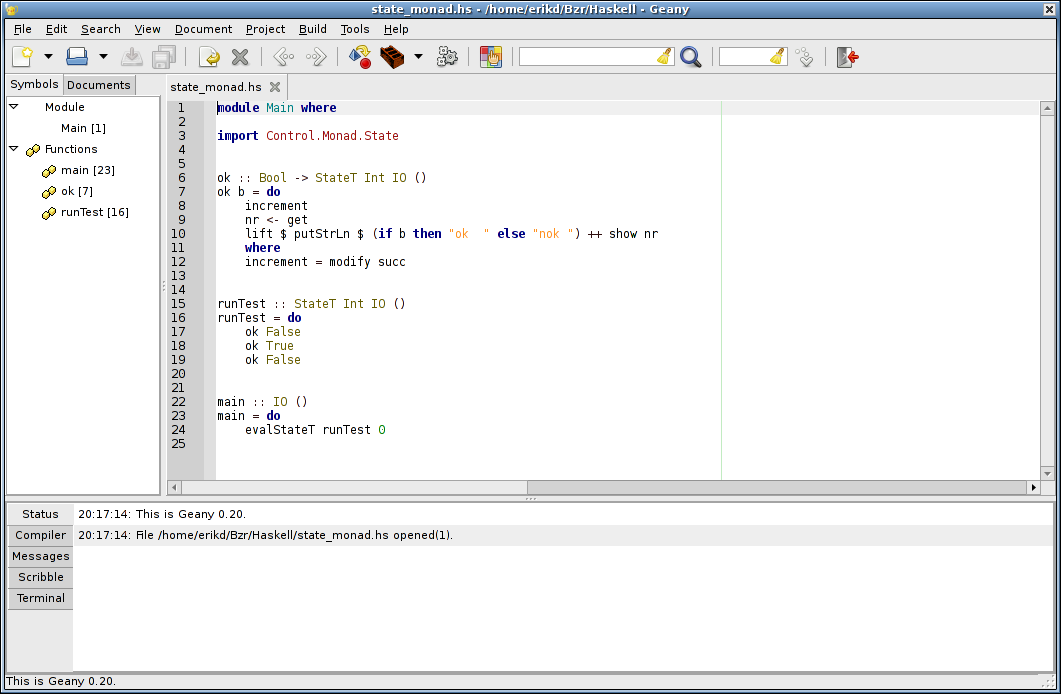
On seeing this I initially thought Geany was not for me. Fortunately I found that the extra IDE-like features can easily be hidden, providing me with a simple-to-use, highly configurable, advanced text editor. The features I really like are:
- High degree of configurability, including key bindings.
- Syntax highlighting (configurable) for a huge number of languages.
- Custom syntax highlighting (ie user definable highlighting for languages not currently supported by Geany).
- Regex search and search/replace.
- Search and replace within a selected area only.
- Highlighting of matching braces and brackets.
- Language specific editing modes and auto indentation.
- Go to specified line number.
- Plugins.
There are still a few little niggles, but nothing like the pain I experienced trying to use Gedit. For instance, when run from the command line, Geany will open new files in a tab of an existing Geany instance. With multiple desktop workspaces, this is sub optimal. It would be much nicer if Geany would start a new instance if there was not already an instance running on the current workspace. After a brief inspection of the Gedit sources (Gedit has the desired feature), I came up with a fix for this issue which I will be submitting to the Geany development mailing list after a couple of days of testing.
Another minor issue (shared with Gedit) is that of fonts. Nedit uses bitmap fonts while Geany (and Gedit) use TrueType fonts. When I choose light coloured fonts on a black background I find the fonts in Geany (and Gedit) a lot fuzzier than the same size fonts in Nedit. I've tried a number of different fonts including Inconsolata but I've currently settled on DejaVu Sans Mono although I'm not entirely satisfied.
Currently my Geany setup (editing some Haskell code) looks like this:
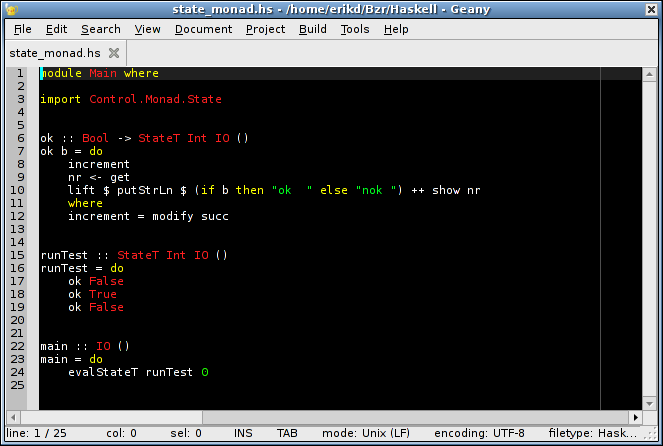
Light text on a black background with highlighting using a small number of colours; red for types, green for literals, yellow for keywords etc.
Geany is a great text editor. For any committed coders currently using either Nedit or Gedit and not entirely happy, I strongly recommend that you give Geany a try.
Posted at: 21:17 | Category: CodeHacking/Geany | Permalink
Tue, 27 Jul 2010
R.I.P. Nedit
For serious programmers, the text editor they user is an intensely personal thing. Try suggesting to an Emacs user that they should switch to Vim or vice-versa. Most would shudder at the thought.
My choice of editor for the last 15 years has been Nedit, the Nirvana Editor. Nedit has been an outstanding editor; feature full yet easy to use. When I first started using it, Nedit was a closed source binary-only download but sometime in the late 1990s, it was released under the GNU GPL.
Unfortunately Nedit has been suffering from bit rot and neglect for a number of years. The main problem is that it uses the Motif widget toolkit. For open source, there are basically two options for Motif; Lesstif, an LGPL reimplementation of Motif which has been basically unmaintained for a number of years, or OpenMotif released under a license which is in no way OSI approved. On top of that, Nedit still doesn't support UTF-8, mainly because Lesstif doesn't support it.
I have, in the past, tried to fix bugs in Nedit, but the bugs are not really in Nedit itself, but in an interaction between Nedit whichever Motif library it is linked against and the underlying X libraries. Depending on whether Nedit is linked against Lesstif and OpenMotif, Nedit will display different sets of bugs. I have tried fixing bugs in Nedit linked against Lesstif, but got absolutely nowhere. Lesstif is one of the few code bases I have ever worked on that I was completely unable to make progress on.
With Nedit getting flakier with each passing year I finally decided to switch to a new editor. I had already discounted Emacs and Vim; switching from Nedit to either of those two archaic beasts was going to be way too painful. Of all the FOSS editors available, Gedit seemed to be the closest in features to Nedit.
Unfortunately, Gedit does not compare well with Nedit feature wise. To me it seems to try to be simultaneously as simple as possible and to have as many features as possible and the features don't seem to fit together all that well from a usability point of view. On top of that, it lacks the following:
- Regex search and regex search/replace. Apparently there is a regex search/replace plugin, but that uses a different hot key combination that literal search/repalce. Nedit on the other hand uses the same dialog box for literal and regex search/replaces; with a toggle button to switch between literal and regex searches.
- Search and replace within the selected area only.
- Highlighting of matching braces and brackets.
- Language specific editing modes and auto indentation.
- A macro language allowing further customisation.
- A simple, quick way to go to a particular line number (for Gedit, Control-L is supposed to work, but doesn't).
On top of that Gedit could also do with some improved key bindings and some improvements to its syntax highlighting patterns. The Ocaml syntax highlighting is particularly poor.
I'm now going to try to use Gedit, by customising its setup and and using the plugin system to see if I can regain the features that made Nedit such a pleasure to use.
Posted at: 22:18 | Category: CodeHacking | Permalink
Sun, 18 Jul 2010
LLVM Backend : Milestone #1.
About 3 weeks ago I started work on the LLVM backend for DDC and I have now reached the first milestone.
Over the weekend I attended AusHac2010 and during Friday and Saturday I managed to get DDC modified so I could compile a Main module via the existing C backend and another module via the LLVM backend to produce an executable that ran, but gave an incorrect answer.
Today, I managed to get a very simple function actually working correctly. The function is trivial:
  identInt :: Int -> Int
  identInt a = a
and the generated LLVM code looks like this:
  define external ccc %struct.Obj* @Test_identInt(%struct.Obj* %_va)
  {
  entry:
      ; _ENTER (1)
      %local.slotPtr = load %struct.Obj*** @_ddcSlotPtr
      %enter.1 = getelementptr inbounds %struct.Obj** %local.slotPtr, i64 1
      store %struct.Obj** %enter.1, %struct.Obj*** @_ddcSlotPtr
      %enter.2 = load %struct.Obj*** @_ddcSlotMax
      %enter.3 = icmp ult %struct.Obj** %enter.1, %enter.2
      br i1 %enter.3, label %enter.good, label %enter.panic
  enter.panic:
      call ccc void ()* @_panicOutOfSlots(  ) noreturn
      br label %enter.good
  enter.good:
      ; ----- Slot initialization -----
      %init.target.0 = getelementptr  %struct.Obj** %local.slotPtr, i64 0
      store %struct.Obj* null, %struct.Obj** %init.target.0
      ; ---------------------------------------------------------------
      %u.2 = getelementptr inbounds %struct.Obj** %local.slotPtr, i64 0
      store %struct.Obj* %_va, %struct.Obj** %u.2
      ;
      br label %_Test_identInt_start
  _Test_identInt_start:
      ; alt default
      br label %_dEF1_a0
  _dEF1_a0:
      ;
      br label %_dEF0_match_end
  _dEF0_match_end:
      %u.3 = getelementptr inbounds %struct.Obj** %local.slotPtr, i64 0
      %_vxSS0 = load %struct.Obj** %u.3
      ; ---------------------------------------------------------------
      ; _LEAVE
      store %struct.Obj** %local.slotPtr, %struct.Obj*** @_ddcSlotPtr
      ; ---------------------------------------------------------------
      ret %struct.Obj* %_vxSS0
  }
That looks like a lot of code but there are a couple of points to remember:
- This includes code for DDC's garbage collector.
- DDC itself is still missing a huge number of optimisations that can added after the compiler actually works.
I have found David Terei's LLVM AST code that I pulled from the GHC sources very easy to use. Choosing this code was definitely not a mistake and I have been corresponding with David, which has resulted in a few updates to this code, including a commit with my name on it.
LLVM is also conceptually very, very sound and easy to work with. For instance, variables in LLVM code are allowed to contain the dot character, so that its easy to avoid name clashes between C function/variable names and names generated during the generation of LLVM code, by making generated names contain a dot.
Finally, I love the fact that LLVM is a typed assembly language. There would have been dozens of times over the weekend that I generated LLVM code that the LLVM compiler rejected because it would't type check. Just like when programming with Haskell, once the code type checked, it actually worked correctly.
Anyway, this is a good first step. Lots more work to be done.
Posted at: 22:18 | Category: CodeHacking/DDC | Permalink
Tue, 29 Jun 2010
LLVM Backend for DDC.
With the blessing of Ben Lippmeier I have started work on an new backend for his DDC compiler. Currently, DDC has a backend that generates C code which then gets run through GNU GCC to generate executables. Once it is working, the new backend will eventually replace the C one.
The new DDC backend will target the very excellent LLVM, the Low Level Virtual Machine. Unlike C, LLVM is specifically designed as a general retargetable compiler backend. It became the obvious choice for DDC when the GHC Haskell compiler added an LLVM backend which almost immediately showed great promise. Its implementation was of relatively low complexity in comparison to the existing backends and it also provided pretty impressive performance. This GHC backend was implemented by David Terei as part of an undergraduate thesis in the Programming Languages and Systems group an UNSW.
Since DDC is written in Haskell, there are two obvious ways to implement an LLVM backend:
- Using the haskell LLVM bindings available on hackage.
- Using David Terei's code that is part of the GHC compiler.
At first glance, the former might well be the more obvious choice, but the LLVM bindings have a couple of drawbacks from the point of view of using them in DDC. In the end, the main factor in choosing which to use was Ben's interest in boostrapping the compiler (compiling the compiler with itself) as soon as possible.
The existing LLVM bindings use a number of advanced Haskell features, that is, features beyond that of the Haskell 98 standard. If we used the LLVM bindings in DDC, that would mean the DDC would have to support all the features needed by the binding before DDC could be bootstrapped. Similarly, the LLVM bindings use GHC's Foreign Function Interface (FFI) to call out the the LLVM library. DDC currently does have some FFI support, but this was another mark against the bindings.
By way of contrast, David Terei's LLVM backend for GHC is pretty much standard Haskell code and since it generates text files containing LLVM's Intermediate Representation (IR), a high-level, typed assembly language, there is no FFI problem. The only downside of David's code is that the current version in the GHC Darcs tree uses a couple of modules that are private to GHC itself. Fortunately, it looks like these problems can be worked around with relatively little effort.
Having decided to use David's code, I started hacking on a little test project. The aim of the test project to set up an LLVM Abstract Syntax Tree (AST) in Haskell for a simple module. The AST is then pretty printed as a textual LLVM IR file and assembled using LLVM's llc compiler to generate native assembler. Finally the assembler code is compiled with a C module containing a main function which calls into the LLVM generated code.
After managing to get a basic handle on LLVM's IR code, the test project worked; calling from C into LLVM generated code and getting the expected result. The next step is to prepare David's code for use in DDC while making it easy to track David's upstream changes.
Posted at: 06:51 | Category: CodeHacking/DDC | Permalink
Sun, 14 Mar 2010
GHC 6.12.1 in Debian Testing.
Joachim Breitner recently announced on the Debian Haskell mailing list that version 6.12.1 of the Glasgow/Glorious Haskell compiler was about to transition from Debian unstable to Debian testing. That has now happened. This means there is a very good chance it will be part of the next stable release of Debian.
A big thanks is due to Kari Pahula, the Debian maintainer for GHC who managed to get this version of GHC working on a bunch of CPU architectures not officially supported by the upstream GHC maintainers. Deserving of equal attention are Joachim Breitner and Marco Túlio Gontijo e Silva who did a large amount of real quality work to improve the way Haskell libraries are packaged in Debian.
The big change recently was drastic improvements in the way library dependencies are tracked across packages which will make it much easier to write tools to automatically check for broken dependency chains. Packaging Haskell libraries for Debian is now a relatively trivial and fool proof exercise. Packaging a library which is on Hackage can take as little as 5 minutes.
With the current version of GHC in Debian and a large and growing collection of Haskell libraries, writing Haskell code on Debian using nothing but Debian packages is now a pleasure. Ubuntu and other Debian and Ubuntu derived distributions of course also benefit from this work.
Posted at: 18:58 | Category: CodeHacking/Debian | Permalink
Thu, 11 Mar 2010
Intel Embedded Graphics Driver Fail.
In my day job I do Linux embedded work and as people in the embedded world know, Linux is a pretty commonly used embedded OS. Today I was evaluating a new board and found it had an Intel graphics chip that was not properly detected by Ubuntu 9.10. The ever trusty lspci said this:
  00:02.0 VGA compatible controller: Intel Corporation System Controller Hub
        	(SCH Poulsbo) Graphics Controller (rev 07)
We all know that Intel employs a bunch of well known Xorg developers, so this shouldn't be a problem, right?
Unfortunately, it is a problem. Intel's offering for this chipset is the Intel® Embedded Graphics Drivers web page where they offer a 124 megabyte download (registration required). After registration you get to choose which driver pack you want and which OS you are downloading it for. Ubuntu was not on the list and neither was Debian. I chose Fedora 10 (released in 2008) as that was the most recent one.
Now, you can image my surprise when the driver download for Fedora Linux contained just four files:
  Archive:  /tmp/IEGD_10_3_GOLD.zip
      testing: UsersGuide_10_3_1525.pdf   OK
      testing: IEGD_10_3_GOLD_1525.exe    OK
      testing: IEGD_SU_10_3_GOLD.pdf      OK
      testing: RELNOTES_10_3_1525.txt     OK
  No errors detected in compressed data of /tmp/IEGD_10_3_GOLD.zip.
Yep, thats right, the driver download for Fedora Linux contains two PDF files, a text file and an executable installer for Windows.
Being the curious (and paranoid) type I decided to explore this further, by running the installer under WINE in a chroot. After the installer you get left with several metric craploads of Java Jar files, and another windows executable iegd-ced.exe that supposedly configures this nightmare. I ran it (again, under WINE in a chroot) but it didn't seem to do anything sensible or worthwhile so I looked around amongst the other installed files and found IEGD_10_3_Linux.tgz.
Inside that tarball there are a bunch of Xorg library binaries (for several different versions of Xorg), a large chunk of source code that gets compiled into the Linux kernel and even better yet, a couple of Microsoft Visual Studio project files. WTF?
Unbe-fscking-lievable. Needless to say, I will avoid any hardware which uses this chipset and any other hardware that requires binary only kernel blobs packaged this badly. Doing so makes my life easier.
The people at Intel who thought this was a good idea must have their own personal mother-lode of stupid.
Posted at: 20:24 | Category: CodeHacking/Embedded | Permalink
Sun, 03 Jan 2010
Debugging Memory Leaks in a GTK+ House of Cards.
Recently I've been hacking on Conrad Parker's sound editing, audio mangling and DJing tool Sweep. As part of my bug fixing and clean up work I ran Sweep under the Linux world's favourite memory debugging tool Valgrind. Even after running valgrind with the officially sanctioned environment variables and gtk suppressions file, the resulting 500k gzipped output file was a little shocking.
Now I'm pretty sure a number of those leaks are in Sweep, but a significant number of them seem to be in GTK+ and Glib. Since trying to differentiate the leaks in Sweep from the leaks in GTK+ was proving to be a very difficult and frustrating task I decided to look at the behaviour of a simple GTK+ program under Valgrind. The program I chose was the helloworld example from the GTK+ tutorial.
Compiling that on Ubuntu 9.10 and running it under valgrind using the following commands:
  export G_SLICE=always-malloc
  export G_DEBUG=gc-friendly
  valgrind --tool=memcheck --leak-check=full --leak-resolution=high \
    --num-callers=50 --show-reachable=yes --suppressions=gtk.suppression \
    helloworld > helloworld-vg.txt 2>&1
resulted in a memcheck summary of:
  ==22566== LEAK SUMMARY:
  ==22566==    definitely lost: 1,449 bytes in 8 blocks
  ==22566==    indirectly lost: 3,716 bytes in 189 blocks
  ==22566==      possibly lost: 4,428 bytes in 107 blocks
  ==22566==    still reachable: 380,505 bytes in 7,898 blocks
  ==22566==         suppressed: 35,873 bytes in 182 blocks
The full memcheck report is available here.
The simplest GTK+ hello world program is 100 lines of code and results in a leak report of over 8000 leaked blocks even when using the recommended valgrind suppressions file and GTK+ debugging environment variables. If someone modifies that code and adds another leak, trying to find that leak needle in the GTK+ leak haystack is going to be a needlessly difficult task.
Researching this some more I find that GTK+ is known to do a large number of allocations that are done once per program run and are never released. Furthermore the GTK+ developers seem to think this is ok and from the point of view of a user running a GTK+ program this is true. However for developers coding against GTK+ and hoping to use Valgrind to find leaks in their own code, this is a royal PITA. Leaks in the developer's code can easily be swamped and hidden by GTK+ leaks. My guess is that most people don't even bother checking unless their program's memory footprint grows over time for no good reason.
Obviously, I'm not the first to realise how hard it is too debug memory leaks in a program when the library it links against throws up so many warnings. In fact, back in 2001 a bug was raised in the GTK+ bug tracker requesting the addition of a call to be used only during debugging that would release all memory so that client programs are easier to debug. That bug has remained open and without action for over 8 years.
As far as I am concerned, this is completely unacceptable.
If this was my code, I would be too ashamed to put my name on it.
Edit: Being able to valgrind GTK+ client code is worth the effort and
cost of changing the otherwise perfectly reasonable behaviour of not accounting
for lifetime-of-the-app data structures (thanks Andrew).
Note: Anyone who wishes to comment on this can do so on reddit.
Posted at: 11:38 | Category: CodeHacking | Permalink

![[operator<< is not my friend]](http://yosefk.com/c++fqa/images/operator.png)
